Wednesday, April 16, 2014

Rogueware Removal - Accelerator Pro Is Fake and How Dangerous It Could Be?

Accelerator Pro Affection Scenario

  1. Accelerator Pro would run automatic scan at each Windows start, which slows down PC speed.
  2. Accelerator Pro would alert long list of problems.
  3. Accelerator Pro redirects PC users to counterfeit registration web site and asks them to fill the information on credit card details, name and the like.


Accelerator Pro Profile


Accelerator Pro has already been identified as a fake anti-virus program that filches the interface of a genuine Windows anti-virus program to cheat money. Its creator has pushed it aggressively on many spam advertising platforms and made a verisimilar registration site. With such luring name and the fine promises, many PC users have been fallen into its trap.


See How Accelerator Pro Worms in A Machine

How to Remove - PUP.Optional.PCPerformer.A Found


PUP.Optional.PCPerformer.A Found


PUP.Optional.PCPerformer.A is flagged by installed anti-virus program with the location: c:/windows/system32/roboot64.exe. At the sight of the detected item, victims would think of PC Performer, the application that has been widely considered to be rogue anti-virus program due to its malicious deeds.


PUP.Optional.PCPerformer.A Concerns


Is PUP.Optional.PCPerformer.A indicating that the computer has PC Performer?

Tuesday, April 15, 2014

Winspool.drv (C:\Windows\system32\WINSPOOL.DRV) Errors – Printer Issues

What Is Winspool.drv, It Is Virus?


Winspool.drv is not virus, it is no more than a print Spooler driver for Windows. It is published by Microsoft Corporation with the model name as Microsoft® Windows® Operating System. Usually, Winspool.drv is put under C:\WINDOWS\system32\ folder with a size of 143KB.

Functions
Without such driver, the printer will not be able to understand the commands from system and do what PC users want. Besides, winspool.drv enables automatic printing in one queue without manually specifying the next one.


WINSPOOL.DRV Errors Scenario


Multiple errors pop up when victim logging into computer telling that C:\Windows\system32\WINSPOOL.DRV is running into error. The commonly seen WINSPOOL.DRV problems are:

[Guide to Fix] Aswrvrt.sys (C:\Windows\System32\drivers\aswrvrt.sys) Causes BSoD and No Boot


What Is Aswrvrt.sys?


Its suffix “sys” could help us ascertain that aswrvrt.sys is a system file in the first place, and thus it is not virus as what most victims thought it is due to the problems incurred thereby as listed in the next section. To be more specific, C:\Windows\System32\drivers\aswrvrt.sys is a PE32 executable for MS Windows (native) Intel 80386 32-bit.


Aswrvrt.sys Problems

  1. BSoD with error code 0x00000000ed.
  2. Computer won’t boot and stuck at aswrvrt.sys.
  3. No access to c: drive
  4. Less options when access Windows Advanced Options windows via F8 functional key.


Causes of Aswrvrt.sys Problems


Based on rich experience in computer industry, the causes of aswrvrt.sys problems are mainly related to hard drive issues.

Monday, April 14, 2014

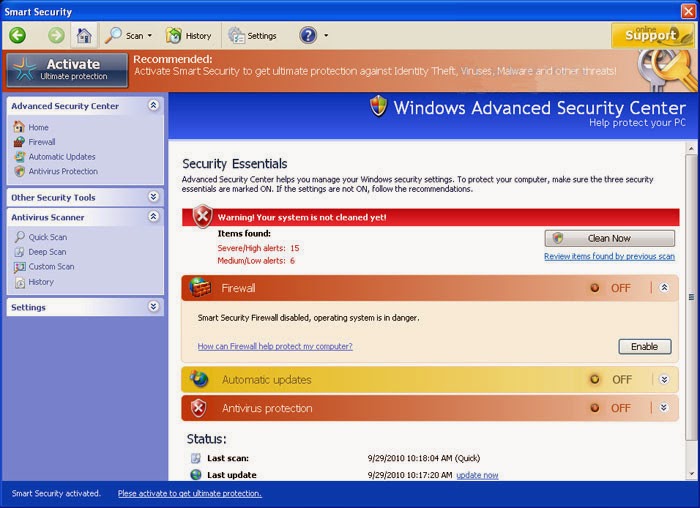
Remove Smart Security Fake Anti-virus Program from Windows

The smart security we are talking about here refers to system smart security rogueware. It acts just like any other fake anti-virus program that fires up at each Windows start and performs a fake security scan requesting the purchase of the fake anti-virus product. Here are some symptoms to show how to tell the genuine anti-virus programs from the fake ones as they all request purchase of a more advanced version:
  1. Fake anti-virus program like smart security would install without knowledge and authorization.
  2. The number of threats reported by smart security would substantially exceed normal range.
  3. The interface of Smart Security shares a lot with other rogue anti-virus program such as Windows Web Watchdog
  4. Browser redirect to registration site always happens.
  5. PC performance becomes much slower than before and it should be.


How Do I Get Smart Security Fake Anti-virus Program?


Smart Security is categorized as rogueware which is a stand-alone infection. It has its own advertising platform which is what we called spam ads/sites. Such sites are not easily recognized as spam unless one is well equipped with knowledge on websites and computer technologies. Usually, the sites own huge traffic (by some rogue means such hijacking) which is the exact thing that attract many more operators. As a result, the advertising sites of Smart Security gain cooperators, putting Smart Security ads on other sites or bundling it to some third-party programs.

Here’s the conclusion on the ways to get Smart Security: